

WinRAR is a popular file archiver utility for Windows, developed by Eugene Roshal of win.rar GmbH. It is used to create, compress, encrypt, and extract files in various archive formats. Here's an overview of WinRAR and its key features:
### Key Features:
1. **Archive Creation**: WinRAR allows users to create compressed archives in various formats, including RAR and ZIP. It supports creating multi-volume archives, which split large archives into smaller parts for easier storage or transmission.
2. **Compression Algorithms**: The software employs high compression algorithms to reduce the size of files and folders, helping users save disk space and transfer files more efficiently. It offers different levels of compression to balance between compression ratio and speed.
3. **Encryption and Password Protection**: WinRAR supports encryption of archives using AES (Advanced Encryption Standard) with a 256-bit key. Users can set passwords to protect their archives from unauthorized access, ensuring the security of sensitive data.
4. **File Splitting and Recovery**: WinRAR can split large archives into smaller parts, facilitating easier distribution or storage. It also includes a built-in recovery record feature that helps repair damaged or corrupted archives.
5. **Integration with Windows Explorer**: WinRAR integrates seamlessly with Windows Explorer, allowing users to create and extract archives directly from the context menu. This makes it convenient to work with archives without launching the main application.
6. **Multi-threaded Compression**: WinRAR utilizes multi-threaded compression to take advantage of multi-core processors, improving compression and decompression speeds on modern hardware.
7. **Support for Various Archive Formats**: In addition to RAR and ZIP, WinRAR can handle a wide range of archive formats, including TAR, ISO, 7Z, CAB, and more. It can also extract contents from archives created by other software.
8. **Command-Line Interface**: WinRAR provides a command-line interface (CLI) for advanced users who prefer automation or scripting. This allows users to perform archive operations from batch files or scripts.
### Availability:
WinRAR is primarily available for Windows operating systems, including Windows 10, Windows 8, Windows 7, and older versions. There is also an unofficial version of WinRAR for macOS, although it lacks some features and is not developed by the official WinRAR team.
### Licensing:
WinRAR is distributed as trialware, which means users can download and use it for free during a trial period (usually 40 days). After the trial period expires, users are encouraged to purchase a license to continue using the software legally. However, WinRAR does not enforce the trial period, and users can continue using the software indefinitely without purchasing a license, albeit with occasional reminders to do so.
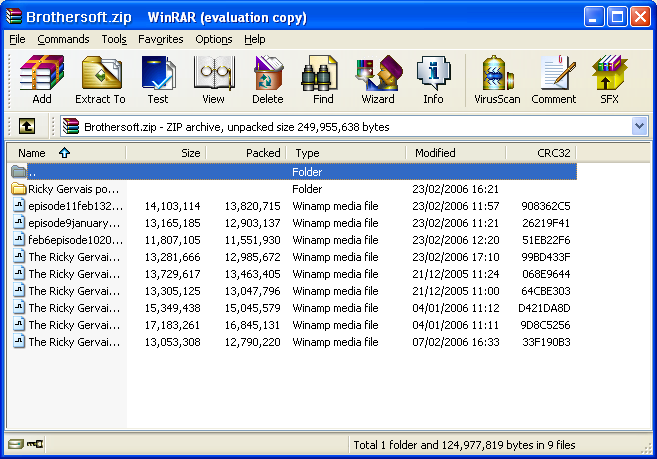
Win RAR System Requirements
- Operating Systems: Windows , Windows 7,Server 2012, Windows 8
- Processor: 32 bit, 64 bit supported
- RAM: 64 MB
- Hard Disk Space: 3 + MB free hard disk required.

.png)
.png)
.webp)

.webp)

0 comments: